




Everything you need to sell on the Marketplace.
Guides, product releases, training and the plays our customers actually use.

No spam. Unsubscribe anytime.


Private Offers on Microsoft Marketplace: Types, Examples, and How to Create Them
Learn how private offers work on Microsoft Marketplace. A guide about direct, CSP, multiparty (MPPO), and resale enabled offers (REO).

Pricing on Marketplace
From the e-book library. Free download, no spam.

Ask Octavia: your new in-app AI support assistant
Meet Ask Octavia, your new AI support assistant, now live inside WeTransact. Ask product questions in plain language, get instant answers, and reach a human when you need one.

Best practice library
24 practices, 3 personas, on bestpractices.wetransact.io.
Marketplace wisdom, written down.









Octavia's notebook.
Keep an eye on every new feature, fix, and integration we ship.
Deal Registration: Bulk Upload, Now AI-Powered
Bulk deal registration just got smarter. Upload any file of your deals from HubSpot, Salesforce, and let Octavia map it to Microsoft's format.

Bulk deal registration just got smarter. Upload any file of your deals from HubSpot, Salesforce, and let Octavia map it to Microsoft's format.
Stop reformatting your deal lists. Now let Octavia do it.
Big news. AI Mapping is now live in Deal Registration. So whenever you upload your lists from HubSpot, Salesforce, or Excel, you no longer need to reshape everything to Microsoft's format. Just upload, and Octavia takes care of the field mapping. Less reformatting, more closing.
You know the drill. You export a deal list from HubSpot, Salesforce, or just a regular Excel and then you spend the next hour reshaping it to match what Microsoft expects. Wrong column names, wrong field values, wrong everything. By the time it's "ready," your coffee's cold and half your team is asking why bulk upload takes so long.
Not anymore.
Now you upload the file you already have. Octavia maps it for you.
Whatever format your deals come in — CRM export, internal sheet, custom template — our AI matches your columns and values to Microsoft's required fields. You review, tweak if needed, hit submit. Done.
What this means for you:
- Less time wrestling with templates, more time uploading and closing your deals
- Fewer formatting errors that block your bulk uploads
- Bring deals in a bulk straight from HubSpot, Salesforce, or Excel without extra effort
How it Works
1. Upload your file

Any format works HubSpot export, Salesforce export, custom Excel, or your team's internal sheet. No template, no reformatting, no preparation. Just drop the file you already have.
2. Let Octavia map it

Octavia scans your file and matches your columns and values to Microsoft's required fields automatically. Customer name, deal value, currency, opportunity stage — all mapped in seconds, not hours.
3. Review and submit

Take a quick look at the mapping. Tweak anything that needs adjusting, then hit submit. Your deals go to Microsoft in bulk — no more uploading them one by one.

Other Launches
- 📨 Smoother email auth for PartnerReach (M365 + Google Workspace): PartnerReach is our feature that lets you run outreach campaigns to Marketplace buyers using your own work email. We rebuilt the M365 and Google Workspace connection flow and added clearer guidance when company security settings or admin approval block authentication in this feature so you connect faster and know exactly what to fix when something goes wrong, instead of hitting a dead end.
- ✅ Cleaner errors when publishing pricing plans: Publishing offers with custom dimensions (like "per API call" or "per user") used to fail silently in our platform when details were missing — you couldn't see an error, and had no clue what went wrong. Now you get a clear validation message pointing to the exact field that needs fixing, so you can publish in one sitting instead of having to open a support ticket.
- 🍞 Toast confirmations for deal actions: Deal Registration is how you submit closed deals for co-sell credit and incentives. We built a trigger now so that every time you create, update, or close (Won, Lost, Error) you get a confirmation toast, to get instant visual proof your action worked. No more refreshing the deal list to double-check.
- 📊 New "Type" column in Finance Earnings: The Finance Earnings table now shows whether each line is a Subscription or Usage-based charge, with meter name and consumption details on hover. Plus now you get more accurate dates and order IDs. Now your finance team can match Marketplace earnings to your books in seconds. no more digging through different views to figure out each line.
- 🔑 Update Finance credentials directly from the Finance tab : Publishing under a new Microsoft tenant requires updated Finance credentials to pull earnings correctly. Admins can now update them directly from the Finance tab in the WeTransact platform.
New to WeTransact and want to see these in action? Book your demo today.
Product Listings & Private Offers: 4 & 5-Year Contracts
Lock in longer deals on Marketplace. 4- and 5-year contracts are now live across Public Plans and Private Offers, fully aligned with Microsoft's support for longer-term deals.

Lock in longer deals on Marketplace. 4- and 5-year contracts are now live across Public Plans and Private Offers, fully aligned with Microsoft's support for longer-term deals.
Now you can lock in longer deals on Marketplace straight from WeTransact.
4 and 5-year contracts are now live across Public Plans and Private Offers. So when an enterprise buyer wants a longer commitment, you can offer it right inside Marketplace straight from the WeTransact platform , fully aligned with what Microsoft supports for longer-term deals.
What's available:
- Public Plans : Add "4 years" and "5 years" alongside monthly, 1, 2, and 3-year options. Any combination of the six lengths, with multi-currency and custom dimensions fully supported.
- Private Offers : Whether it's a Direct, Multi Party Private Offer, or CSP private offer, you can now offer 4- and 5-year terms with no extra setup.
- Notice: Private Plans still only support up to 3 years.*If you’re setting one up, you’ll only see 1-, 2-, and 3-year options — not 4 or 5 years — because Microsoft doesn’t allow longer terms there.
What this means for you:
- Offer enterprise buyers the longer terms they're asking for
- Close bigger, longer multi-year deals straight from WeTransact
- 4- and 5-year deals still count for MACC and co-sell, for the whole contract.
See how it works to create a +4 year public plan
1. When you are drafting your first Product Listing, you'll have the option to add your pricing. Input the basic information around your plan.

2. Select your pricing options. In this example, I am choosing the default plan which is to create a public plan that allows Microsoft to happily sell our product in countries where the tax will be handled on their side.

3. Finally, time to wrap up your Pricing Model. This is where you'll define your subscription length (where you can now choose 4 or 5 years) , the billing interval (how many times it will be charged) , your currency, the price, amongst other options.

4. And you are done! Congrats on adding your pricing plan.

Other launches this week
📋 Cloned Private Offers keep subscription lengths: When you clone a published private offer in the WeTransact platform, the new copy now keeps all previously configured subscription lengths, not just the one originally selected. So if the original included 1-, 3-, and 5-year options, the cloned offer preserves all of them. Faster to spin up similar deals without havingt to reconfigure terms.
Want to see how it works? Book your demo today.
Auto-Activation: Automatically approve new orders to your listing
Start billing the moment a customer buys. Auto-activation is now live in WeTransact. Skip the manual activation step for new orders coming to your listing.

Start billing the moment a customer buys. Auto-activation is now live in WeTransact. Skip the manual activation step for new orders coming to your listing.
Auto-Activation for new orders coming to your listing 🆕
Start billing the moment a customer buys, no manual verification needed.
Microsoft just rolled out auto-activation for subscriptions on Marketplace, and WeTransact supports it from day one.
Turn it on, and your customer's subscription activates the instant the purchase completes. Billing starts immediately, no manual confirmation needed.
What's now possible:
- Faster time-to-revenue : billing starts the day of purchase from your customer instead of waiting on your activation.
- Cleaner customer experience : buyers access your product right after checkout, no waiting in limbo.
Heads up: Not every product fits auto-activation. If you need validation steps, coordinated provisioning, or a defined go-live moment before billing starts, keep it OFF and manage activation manually. Talk to your CSM to understand what is the best option for you.
Where to find it in WeTransact
When you create a new Listing, you'll now see an auto-activation toggle in the setup flow in the Order Approval tab. Switch it on or off depending on how you want billing to start for new orders coming to your listing.


WeTransact for Salesforce: Co-Sell deals and Private Offers creation
WeTransact is available on Salesforce AppExchange

WeTransact is available on Salesforce AppExchange
WeTransact for Salesforce 🆕
Run your Microsoft Marketplace motion without leaving your SalesForce CRM.
WeTransact is available on Salesforce AppExchange. Your sales team can register Co-Sell deals and create Private Offers directly from any Salesforce Opportunity, with everything syncing back to WeTransact automatically. No more switching tabs, no more chasing reps to register deals in another tool.
What's now possible:
- Co-Sell from Opportunity pages : Launch the Co-Sell Wizard from any Salesforce Opportunity and register the deal with Microsoft without leaving your CRM.
- Private Offers from Opportunity pages : Create and manage Private Offers right next to the deal they belong to, with offer status and sync status visible at a glance.
- Two-way sync with WeTransact : Deal status, offer status, and sync status update automatically in both systems, so your Salesforce data stays in line with your Marketplace activity.
- MACC Eligibility: Check if an account is MACC-Eligible directly from the CRM without having to switch tabs.
What this means for you:
- Sales teams stay in Salesforce ( where they already work )= and Co-Sell registration stops being an afterthought
- Marketplace data lives next to the Opportunity, giving leadership and RevOps a full picture of every deal
- No more "did anyone register that deal?" . You can look it upright there on the Opportunity page
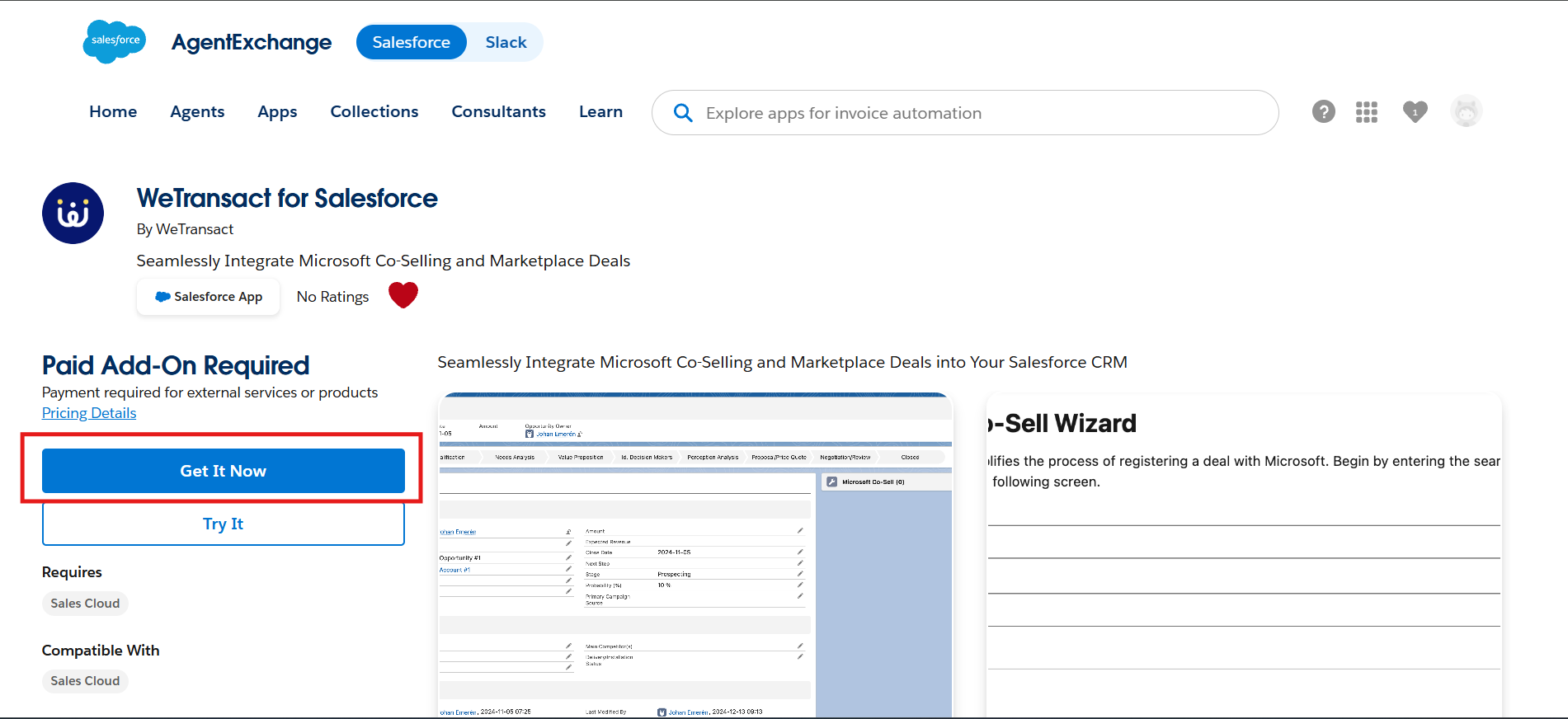
How to get it
Your Salesforce admin can install WeTransact for Salesforce directly from the AppExchange. Setup takes about 15 minutes and includes:
1. Installing the package from AppExchange
2. Assigning permission sets to the right users (Admin, Co-Sell, Private Offers)
3. Connecting the API to your WeTransact tenant
4. Adding the Co-Sell and Private Offer panels to your Opportunity layout

Currently available to all WeTransact customers. Contact your CSM or support@wetransact.io for questions or jump straight to the full installation guide.
Ask Octavia: your new in-app AI support assistant
Meet Ask Octavia, your new AI support assistant, now live inside WeTransact. Ask product questions in plain language, get instant answers, and reach a human when you need one.

Meet Ask Octavia, your new AI support assistant, now live inside WeTransact. Ask product questions in plain language, get instant answers, and reach a human when you need one.
Get answers to your Marketplace questions without leaving WeTransact.
Octavia just got a new job. She's now your in-app AI support assistant, ready to answer product questions in plain language the moment you have them. No more digging through docs, no more opening a new tab, no more waiting for an email reply just to find out where a setting lives.
Ask her a question. Get an answer. Keep moving.
What's now possible:
- Ask in plain language : Type questions the way you'd ask a colleague. "Where do I update Finance credentials?" "How do I clone a Private Offer?" "What's the difference between a public plan and a private plan?" Octavia understands the context and points you in the right direction.
- Get answers inside the platform : No tab-switching, no doc-hunting. Octavia surfaces the answer right where you're working, often with a link to the relevant guide if you want to go deeper.
- Escalate to human support, easily : If Octavia can't fully help, you can hand off to the support team from the same interface. One workflow, no channel-switching.
- Help her get better : Every answer comes with a thumbs up / thumbs down. Your feedback shapes how she answers next time.
What this means for you:
- Fewer interruptions in your day : most questions get answered in seconds
- Faster onboarding for new team members who don't know where everything lives yet
- A clear escalation path when you do need a human, without restarting the conversation
How it works
Ask Octavia lives in the bottom-right corner of the WeTransact platform. Click the icon, type your question, and she'll respond with a context-aware answer pulled from WeTransact's documentation and product knowledge.

If the answer fully solves your question, great you're done. If it gets you partway there, she'll point you to the relevant doc. If you need a human, the Contact Support option is right there in the chat.

See Ask Octavia in action
Here's a real example of the kind of conversation Octavia can guide you through — a Private Offer setup, which is one of those tasks where a wrong turn early on can cost you time later.

Instead of dumping every option on you, Octavia starts by clarifying which of the three Private Offer types fits your deal — Direct (DPO), Multi-Party (MPPO), or CSP — and explains when each one applies.

Once you answer, Octavia recommends the right path and gives you a checklist of what you'll need before starting.

That's the kind of guidance Octavia can offer . Not just answering questions, but helping you avoid the small mistakes that slow deals down.
A note on what to expect
Ask Octavia is built to help you find answers faster — but she's an AI, which means her responses are generated, not curated. She's great for product questions ("how do I do X?"), navigation help ("where do I find Y?"), and getting unstuck.
For account-specific issues, billing questions, or anything that needs human judgment, the support team is one click away in the same window.
We're also actively improving her based on your feedback. Every thumbs up and thumbs down tells us where she's nailing it and where she needs sharpening, so the more you use her, the smarter she gets.
Where to find her
Octavia is now live in the WeTransact platform for all users. Look for the chat icon in the bottom-right corner . Give her a try the next time you have a question.

Don't have an account yet? Start WeTransact today - starting for free.


Deep dives you can keep.

Hit the Jackpot with Microsoft Incentives

Pricing on Marketplace

Private Offers Mayhem

Navigating Microsoft Programs

Unlock Success with Microsoft's Transactable Partner Programs

Selling to End Customer

Understanding Marketplace Billing and Financials

Microsoft FY26 Marketplace Incentives

We teach your team the Microsoft playbook
The platform comes with the people who already know how this works. Every plan, from day one.


Ask Octavia


