
Julia Do Prado
Marketing Lead

.svg)
.svg)
Learn how private offers work on Microsoft Marketplace. A guide about direct, CSP, multiparty (MPPO), and resale enabled offers (REO).
.png)
If you sell software on Microsoft Marketplace, private offers are how you close deals. They are offers that llet you send custom pricing and terms to a specific customer, reseller, partner (or all of them at once!!).
There are three different types, each designed for a different deal structure. Some support MACC (Microsoft Azure Consumption Commitment) budgets, others don't. And if you've ever tried creating one inside Partner Center, you know it's not exactly an easy experience.
Here I'll break it down for you. You'll learn what private offers are, the three types available on Microsoft Marketplace, when to use each one, and how to create a private offer in minutes using the WeTransact platform without having to touch Microsoft's Partner Center.
A private offer is a custom deal between you and a specific buyer (your end-customer) or reseller (which will send to the end-customer) on Microsoft Marketplace. Unlike your public plan which anyone can browse and purchase, a private offer is a one-time purchase inside your plan only visible to the recipient you send it to.
Private offers let you customize things that a public plan can't handle: negotiated discounts, custom subscription lengths, specific contract terms, and deal structures that involve resellers or partners.
So a private offer is the custom proposal you send after a sales conversation with tailored pricing, specific terms, and a clear path for your customer to close the deal.
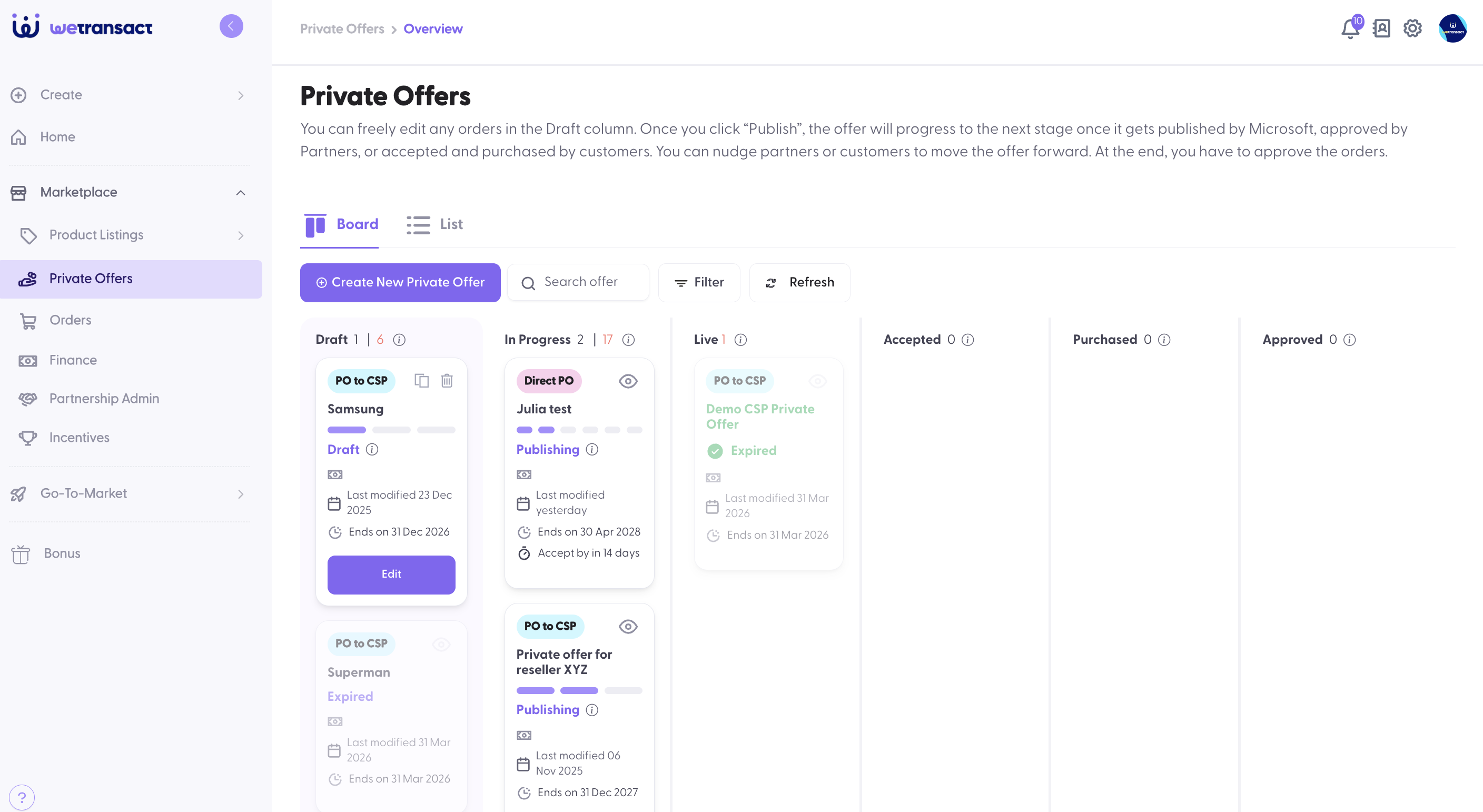
Private offers is how revenue happens in Microsoft Marketplace.
Here's an example. When closing a big Enterprise deal, your customers are expecting custom pricing. Large buyers don't purchase off a public listing. They negotiate. Private offers give you the flexibility to offer volume discounts, extended terms, and custom conditions ( all within the Marketplace transaction framework).
Private offers unlock MACC budgets. Over 90,000 enterprise accounts have millions in committed Azure budgets that needs to get spent (MACC). When you send a private offer, eligible customers can apply their MACC budget to the purchase. That's pre-allocated budget actively looking for solutions to fund.
They enable channel sales. Selling through resellers and distributors? Private offers are how you extend deals to CSP partners, manage multiparty transactions, and track everything in one place.
Using platforms like WeTransact you can see exactly where every deal stands and make everything trackable. Every private offer has a status . Likely pending, accepted, purchased, expired. So you don't have to chasecustomers over email asking if they signed. You can see exactly where every deal stands.
Microsoft Marketplace supports four types of private offers. The first three (direct, CSP, and multiparty) cover most deal structures. The fourth , resale enabled offers , is a newer model designed for scaled channel sales. Choosing the right type depends on two questions: Are you selling through a reseller? and Does the customer need to use their MACC budget?
A direct private offer is the most common type. You send it directly to your customer . No reseller is involved here.
Parties involved: You (the software vendor) and the end customer.
How it works: You create the offer, enter the customer's Azure billing account ID, set your custom pricing and terms, and publish. The customer gets a notification and can review, accept, and purchase the offer through their Azure portal.
Does it support MACC? Yes. If your customer has a Microsoft Azure Consumption Commitment, they can apply it to a direct private offer. This is one of the biggest advantages since the deal counts toward their committed spend.
When to use a direct private offer:
What you need from the customer: Their Azure billing account ID. They can find it in their Azure portal under the Billing section. You'll need to request this before creating the offer.
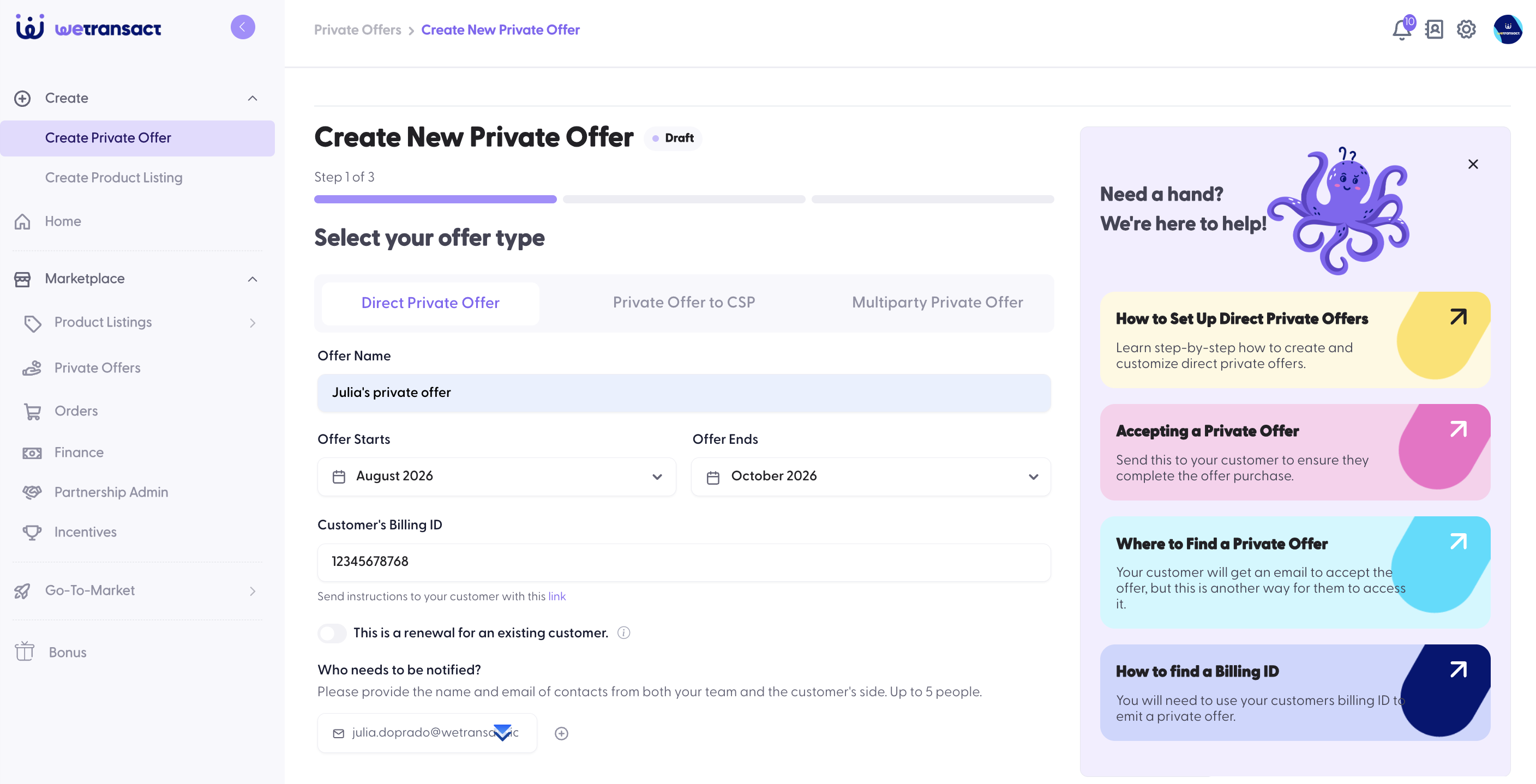
Here's what the flow actually looks like inside the platform, step by step:
1. Enter the customer's billing account ID. This is the first field you'll see. Paste the billing account ID your customer shared with you . They find it in their Azure portal under Billing.
2. Add contact details. Enter the customer's name and email. You can add multiple email addresses so everyone on the customer's side gets notified when the offer is live. All emails need to be lowercase.
3. Set the timing. You'll see three date settings:

4. Attach terms and conditions. Upload a PDF with your custom agreement, your standard contract, deal-specific terms, or any conditions you've negotiated. You can also always use the standard Microsoft agreement.
5. Choose pricing. This is where it gets interesting. Every private offer is based on a public plan. You'll see your existing plans listed with their subscription lengths.
6. Review and publish. Check everything. Customer details, dates, pricing, terms and hit publish. The customer receives an email notification with a direct link to the private offer. They can also find it in the Private Offer Management section of their Azure portal.
After publishing: The offer appears in your Private Offers dashboard with a live status. There are two steps on the customer's side. First they accept the offer, then they purchase it. You can track both stages from your dashboard. And if the deal changes, you can withdraw the offer. You have a cancellation window after publishing.

Example: You sell a cybersecurity platform. An enterprise customer with a $3M MACC commitment wants a 20% discount on a one-year subscription. You create a direct private offer with the negotiated pricing. They accept in their Azure portal, apply their MACC budget, and the deal closes all through Marketplace.
A CSP private offer is for selling through a Cloud Solution Provider which is a reseller who buys your solution and then resells it to their end customer.
Parties involved: You (the software vendor) and the reseller (CSP). The end customer buys from the reseller, not from you.
How it works: You create the private offer and enter the reseller's tenant ID instead of a customer billing account ID. The offer appears on the reseller's dashboard. They accept it on their end and manage the customer relationship.
Does it support MACC? No. This is the main difference. In a CSP private offer, the end customer cannot apply their MACC budget. If the customer needs to use their committed Azure spend, you'll need a multiparty private offer instead.
When to use a CSP private offer:
What you need: The reseller's tenant ID. You can look it up using Microsoft's "Find My Tenant" tool, just enter the reseller's domain name.
The flow is almost identical to a direct private offer but with one key difference in the recipient field.
1. Enter the reseller's tenant ID. Instead of a customer billing account ID, you enter the reseller's tenant ID. You can find any CSP's tenant ID directly inside WeTransact's platform. You just type the company name and the platform will look up their details.

2. Same workflow from here. The rest of the process like timing, terms and conditions, and pricing works exactly like a direct private offer. Same fields, same options, same fast path with existing plans.
3. Publish but know where it lands. When you publish a CSP private offer, it goes to the reseller's dashboard not the customer's Azure portal. You won't have visibility into what happens on the reseller's side. The reseller accepts the offer using their own tools and support team.
The good thing is that WeTransact handles everything on your side, and we provide a guide that shows resellers how to find and accept the offer on their end. But you also get to see the status directly from the WeTransact platform's private offer kan-kan board.
Example: Pax8, a major cloud distributor, wants to resell your compliance platform to their partner network. You create a CSP private offer with Pax8's tenant ID. They accept it, handle distribution, and sell to end customers. You get paid all through Marketplace.
Remember: If you want to do a CSP private offer but the customer also wants to use their MACC budget , stop. That's not possible with a CSP offer. You'll need a multiparty private offer instead. This is one of the most common mistakes our customers make, and it can delay deals big time.
A multiparty private offer ( MPPO) is the most powerful type. It involves three parties: you, a reseller, and the end customer. And, it supports MACC.
How it works: You create the offer with both the end customer's Azure billing account ID and the reseller's tenant ID. The offer is visible to both parties. The customer can accept it in their Azure portal and apply their MACC budget. The reseller is part of the transaction chain.
Does it support MACC? Yes. And this is why multiparty private offers exist. When a deal involves a reseller AND the customer has committed Azure budget, the MPPO is the only offer type that makes both work together.
When to use a multiparty private offer:
What you need: The end customer's Azure billing account ID AND the reseller's tenant ID.
The MPPO combines elements of both the direct and CSP flows. You'll enter details for two parties instead of one.
1. Enter the customer's billing account ID. Same as a direct offer. Your customer finds this in their Azure portal under Billing. You'll need to request it from them.
2. Enter the reseller's tenant ID. Same as a CSP offer. Type in the reseller name and WeTransact gives you the number.

3. Same pricing, timing, and T&C workflow. Everything else works the same way as the other two offer types. Set your start date, end date, and acceptance deadline. Upload your terms. Choose pricing from an existing plan (fast path — live in 10–15 minutes) or create new pricing (10–12 hours).
4. Publish. The offer is visible to both the customer (in their Azure portal) and the reseller (on their dashboard). The customer can apply their MACC budget. The reseller is part of the transaction chain.
The multiparty private offer is the only offer type where a reseller is part of the deal AND the customer can use MACC. If a customer says "I want to buy through my reseller and use my Azure committed budget" the MPPO is the only path that works.
Example: A Fortune 500 company wants your data analytics platform. They have a $5M MACC commitment and want to apply it. But procurement requires the deal to go through their preferred system integrator. You create a multiparty private offer. The reseller is involved in the deal, the customer applies their MACC, and everyone transacts through Marketplace. Without the MPPO, this deal structure wouldn't be possible.
Resale enabled offers are the newest addition to Microsoft Marketplace. They work differently from the three offer types above and mixing them up with CSP private offers is one of the most common mistakes our customers make.
Note: WeTransact does not currently support resale enabled offers. We're sharing this section so you understand how REOs work and how they compare to CSP private offers and MPPOs so you can make the right call for your channel strategy.
The key difference in one sentence: A CSP private offer gives a margin to a CSP partner who then bills the customer outside Marketplace. A resale enabled offer authorizes a partner to transact on Marketplace on the software vendor's behalf, with Microsoft collecting payment from the customer.
Parties involved: You (the software vendor), a resale partner, and the end customer but your involvement is front-loaded. You authorize the partner once, and then they operate independently later.
How it works: You create a one-time authorization in Partner Center for a specific channel partner and a specific offer. After that, the partner independently creates and manages private offers for their customers without you being involved in each deal. The customer transacts directly through the Azure portal. Microsoft collects payment and pays the resale partner. The partner then pays you off-Marketplace, per your own agreement.
Does it support MACC? Yes. If your offer has Azure IP Co-Sell status, the purchase counts 100% toward the customer's MACC.
When to use a resale enabled offer:
When NOT to use it:
1. You authorize the partner. In Partner Center, you create a resale enabled offer authorization. This is tied to a specific offer, one channel partner, and one or more customer markets.
2. Partner creates private offers independently. Once authorized, the partner can create private offers for their customers whenever they want, they don't involve you per deal. They set the customer price, terms, and timing.
3. Customer buys through the Azure portal. The customer sees a standard private offer in their Azure portal, accepts it, and purchases. From the customer's perspective, it looks like any other Marketplace purchase.
4. Microsoft pays the partner. Microsoft collects from the customer and pays the resale partner per standard Marketplace payout policies. The partner then pays you off-Marketplace, per whatever terms you've agreed on.
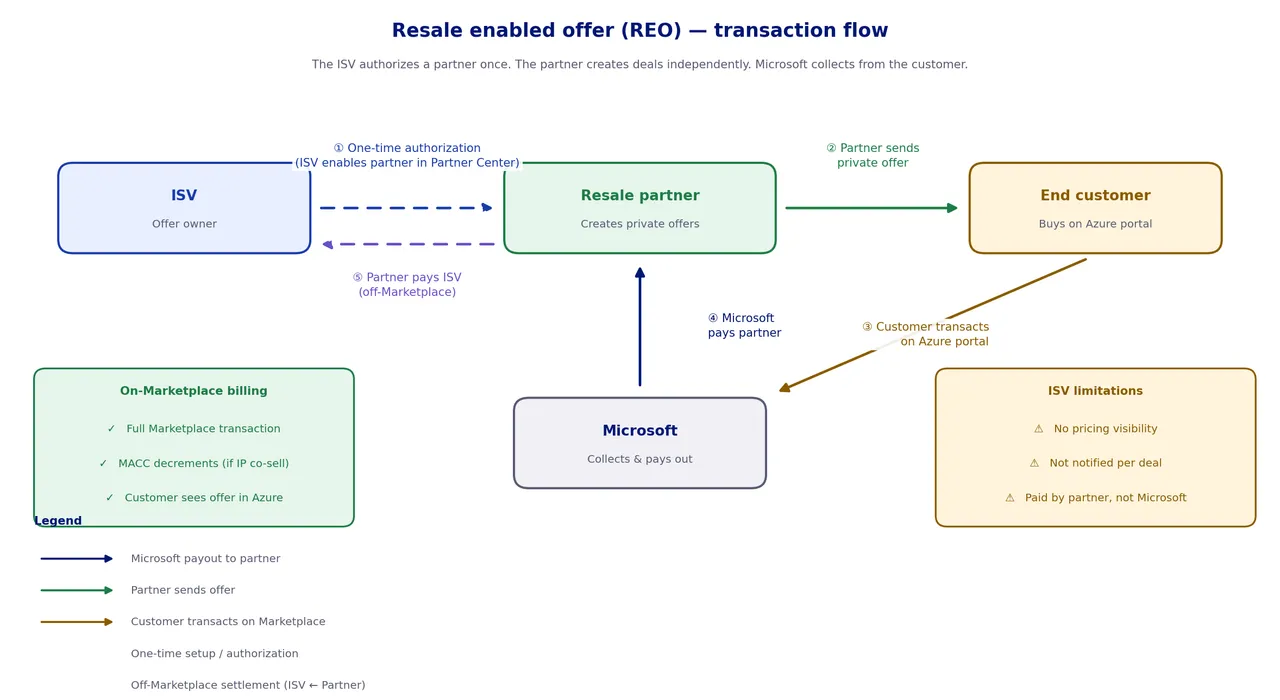
WeTransact note: Again, we don't support resale enabled offers yet. If you're evaluating REOs for your channel strategy, talk to our team and we can help you think through the right model for your partners.
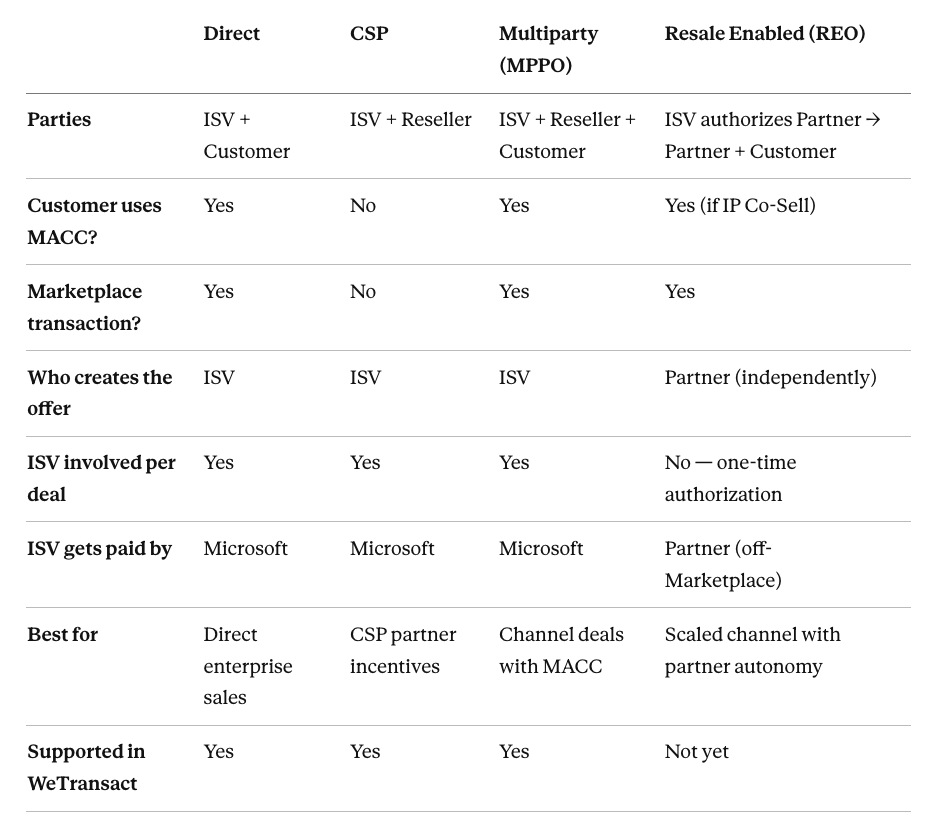
If you're wondering why use WeTransact instead of creating private offers directly in Partner Center, let's get into it:
One workflow for all three offer types. In Partner Center, direct, CSP, and multiparty offers each have different navigation paths and interfaces. In WeTransact, it's the same screen, just pick the type and go.
No engineering dependency. Partner Center often requires technical setup, API integrations, or engineering support to manage offers at scale. WeTransact removes all of that need. Just create your account login and send your first private offer.
Faster time to live. Using an existing plan? Your private offer is live in 10–15 minutes. In Partner Center, the same process involves more manual steps and more room for error.
Track everything in one dashboard. Every private offer you've ever created ( direct, CSP, multiparty ) lives in one overview. Status, acceptance, purchase, stalls. Way more visibility.
Built-in reseller search. WeTransact lets you search for resellers directly in the platform.
What's the difference between a private offer and a private plan?
A private plan is a hidden pricing tier on your public listing visible only to specific customers you've allow listed. A private offer is a custom deal you send to a specific buyer with negotiated pricing, terms, and a deadline. Private offers are more flexible and are the standard way to close negotiated deals on Microsoft Marketplace.
Can I withdraw a private offer after publishing it?
Yes. You can withdraw a private offer if the deal changes or you made an error. Keep in mind that for CSP offers, the offer has already landed on the reseller's dashboard, so communicate the change to them directly.
How long does it take for a private offer to go live?
If you use an existing public plan as the pricing base, the private offer goes live in about 10–15 minutes. If you create new pricing (a new plan), it takes 10–12 hours because WeTransact needs to publish a placeholder plan in the background first.
Can the customer use MACC with all private offer types?
No. Direct private offers and multiparty private offers (MPPO) support MACC. CSP private offers do not. If your customer needs to apply their committed Azure budget and the deal involves a reseller, use a multiparty private offer.
Where does the customer find their billing account ID?
In the Azure portal, under the Billing section. You'll need to request this from your customer before creating a direct or multiparty private offer.
Do I need to use Partner Center to create private offers?
Not if you use WeTransact. WeTransact handles the entire private offer workflow including creation, pricing, publishing, and tracking without needing to log into Partner Center. Note: resale enabled offers (REOs) are not yet supported in WeTransact and currently require Partner Center.
What's the difference between a CSP private offer and a resale enabled offer?
They're both channel models, but they work very differently. In a CSP private offer, the software vendor creates each margin, and the customer is billed outside Marketplace (no MACC). In a resale enabled offer, the ISV authorizes the partner once, and the partner independently creates private offers where the customer buys through the Azure portal (MACC eligible). The vendor gets paid by Microsoft in a CSP deal, but by the partner in a resale enabled deal.
Can I control pricing with a resale enabled offer?
No. Once you authorize a partner, they set the customer price independently. You have no visibility into what they charge. If pricing control is important, a CSP private offer or multiparty private offer gives you more control.
Does WeTransact support resale enabled offers?
Not yet. Today, WeTransact supports direct, CSP, and multiparty private offers. If you're evaluating resale enabled offers for your channel strategy, reach out to our team and we can help you think through the best model.
WeTransact handles direct, CSP, and multiparty private offers in one simple workflow. No Partner Center. No documentation nightmares. Just create, publish, and close.
Need help choosing the right private offer type for your deal? Book a demo and we'll walk you through it.